🔧 Interactive Valve Shim Calculator (1KZ-TE)

Tap a valve → enter current shim & measured clearance → get required shim

📖 How to Measure Valve Clearance (1KZ-TE)

▼

Follow this step-by-step guide to correctly measure your valve clearances. The calculator will use your measurements to determine the correct shim sizes.

STEP 1

🔧 Preparation

  • Ensure the engine is cold (room temperature).
  • Remove the cylinder head cover (rocker cover).
  • Have your feeler gauge and micrometer ready.
⚠️ Important: Always measure with a cold engine.
STEP 2

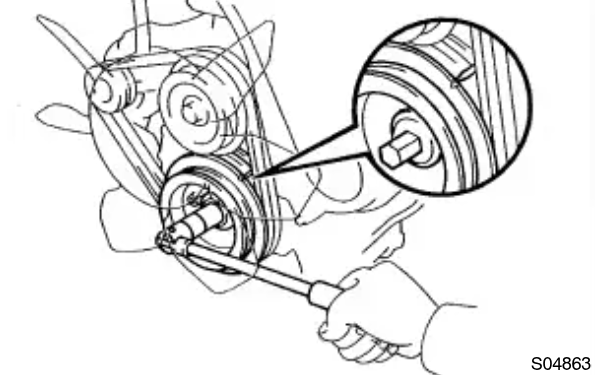
🔄 Set Cylinder 1 to TDC

  • Rotate the crankshaft pulley in a clockwise direction and align its groove with the timing pointer.
  • Check that the valve lifters on No. 1 cylinder are loose.
  • Check that the valve lifters on No. 4 cylinder are tight.
  • If not, turn the crankshaft one full revolution (360°) and re-align.
TDC Alignment Diagram
STEP 3

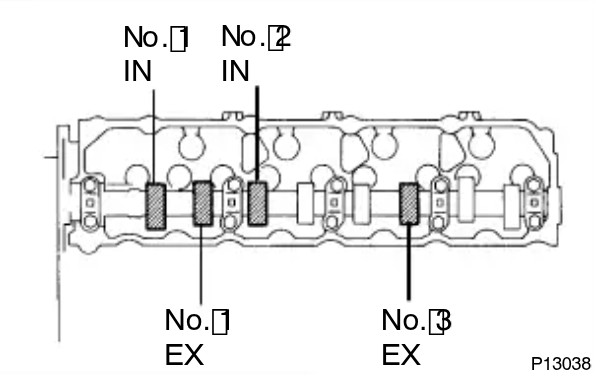
📏 Measure First Set of Valves

  • With No. 1 cylinder at TDC, measure the clearance for the valves indicated below.
  • Use a feeler gauge between the valve lifter and camshaft.
  • Record each measurement carefully.
🎯 Target (Cold): Intake: 0.25mm 🎯 Target (Cold): Exhaust: 0.30mm
Valve Measurement Diagram
STEP 4

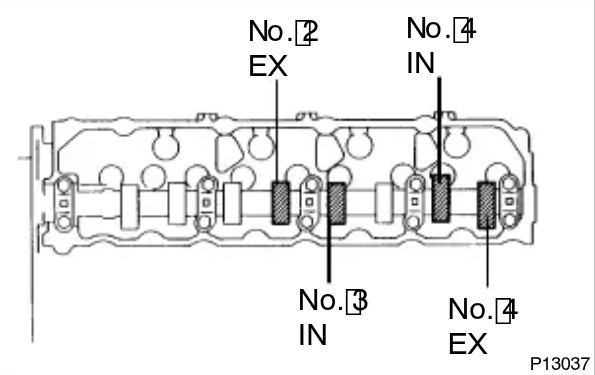
🔄 Turn Crankshaft 360°

  • Turn the crankshaft one full revolution (360°).
  • Re-align the timing mark with the pointer.
  • Now measure the remaining valves.
Valve Measurement Diagram 2
STEP 5

💾 Enter Data & Calculate

  • Tap each valve on the cylinder head map below.
  • Enter the current shim thickness (measure it with a micrometer).
  • Enter your measured clearance from the feeler gauge.
  • Click "💾 Save" - the calculator will show the required new shim.
  • The 📦 Inventory section tracks all your shims automatically.
💡 Tip: Click any shim in inventory to set it as "Current" for the selected valve. ✅ Green = In spec 🔧 Orange = Needs shim

📍 Cylinder Head — Valves

Not measured Measured Clearance In spec Needs shim
Required shim size & number

🎯 Selected Valve

Click a valve on the map
New Shim = Current Shim + (Measured Clearance - Target Clearance)

📦 Your Shim Inventory 0

No shims added yet.
They'll auto-add as you save measurements.
💡 Current shims auto-add when you save. Click any shim to set as "Current" for selected valve.
📍 Orange tags show which valve(s) have this shim installed.
Manually add spare shims (not currently installed). Click the ✕ on any shim to delete it.

📊 Summary

Total
0
Measured
0
✅ In spec
0
🔧 Need shim
0
Save your valve measurements first. Current shims auto-add to inventory.